

Why is my website not showing on Google?
In most cases, Google has not indexed the site yet, or something is stopping it from being indexed.
A new site can take anywhere from a few days to a few weeks to appear.
For older sites, the usual causes are a noindex tag, a robots.txt block, crawling errors, a manual action, or content that Google does not consider useful enough to show.
Sometimes the site is indexed but ranks too low to be found easily, which is a different problem with a different fix.
This guide shows how to tell which situation you are in.
It then walks through each common cause, how to check it in Google Search Console, and how to fix it.

Why Is My Website Not Showing Up on Google? Start With a Quick Triage
Start with one question: why is my website not showing on Google, and is it really missing?
A missing site and a low-ranking site are two different problems.
A missing site has a technical cause.
A low-ranking site has a content or authority cause.
If you mix them up, you can spend weeks fixing the wrong thing.
Run the Site Search Test
Type site:yourdomain.com into Google.
If pages appear, Google has indexed your site.
If nothing appears, you have an indexing problem.
Turn off SafeSearch before you test.
Treat the number of results as a rough guide only.
The accurate numbers live in Google Search Console.

Why Is My Website Not Visible on Google, or Is It Just Ranking Low?
Here is a quick shortcut.
Search for your exact business name.
If your homepage appears, the site is indexed, and your real problem is ranking.
If it does not appear, look for indexing blocks, penalties, or a domain problem.
This check helps separate an indexing problem from a ranking problem.
Why Is My Website Not on Google? New Websites and Slow Discovery
A brand new domain can take a few days to a few weeks to appear.
After you submit a sitemap, wait at least a week before assuming there is a problem.
Sending repeated indexing requests does not speed things up.
Use the waiting time to help Google discover your site.
- Link your homepage to your most important pages.
- Get a link from an existing website or business profile.
- Add your site to your social profiles and Google Business Profile.
Google finds new sites mainly by following links from sites it already knows.
Why Is My Website Not Indexed by Google? Understanding Index Status
Crawling and indexing are not the same thing.
Crawling means Google visited the page.
Indexing means Google stored the page and may show it in results.
Many site owners treat these as one step, and that confusion leads to wrong fixes.
Why Is My Website Not Listed on Google? Read the Page Indexing Report
Open Search Console and go to Indexing, then Pages.
Two statuses cause the most confusion.
“Discovered, currently not indexed” means Google knows the URL but has not crawled it yet.
The usual causes are weak internal links or a slow server.
“Crawled, currently not indexed” means Google visited the page and decided it was not worth storing.
That is a quality signal, so the fix is better content, not more indexing requests.

Diagnose Pages With Google Search Console and the URL Inspection Tool
Add a Domain property first.
A URL-prefix property splits data between the http, https, www, and non-www versions.
That split makes people read their data incorrectly.
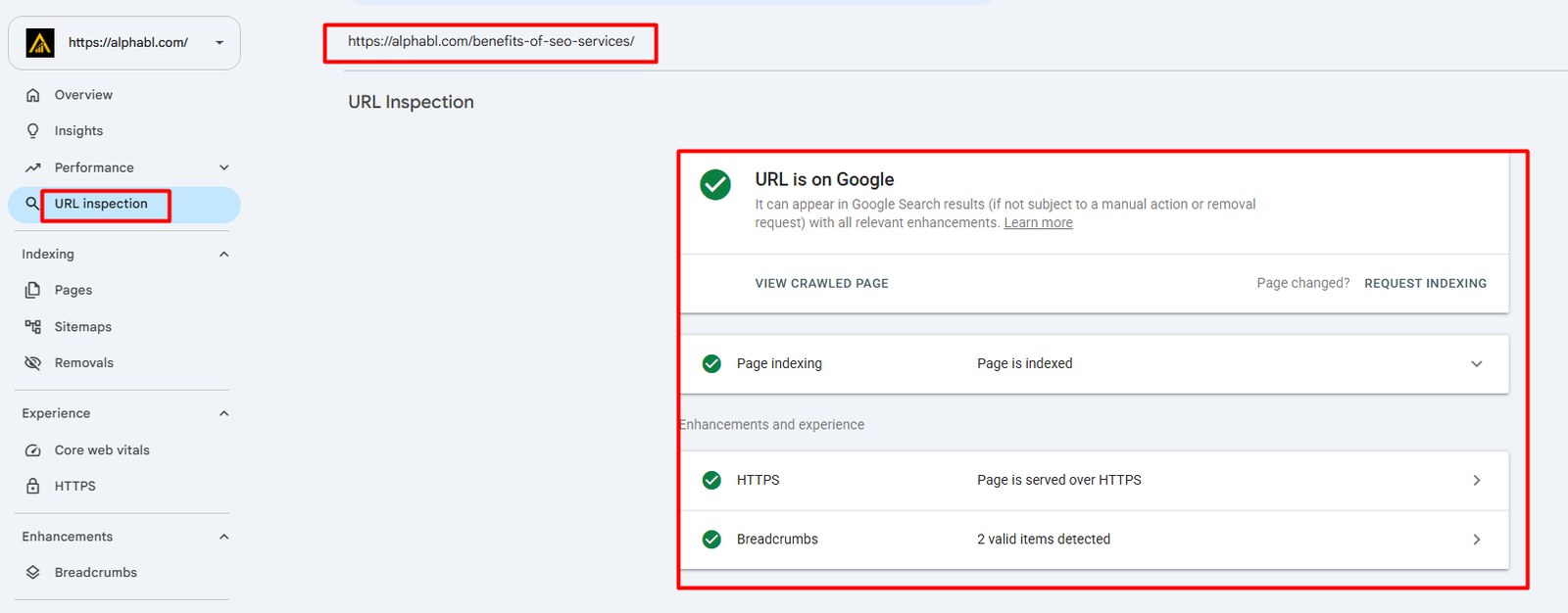
Next, paste the page URL into the URL Inspection tool.
The “Test live URL” button shows what Google sees right now, not an old saved copy.
Submit Your Sitemap and Request Indexing the Right Way
Your sitemap should list only the pages you want to rank.
Remove thank-you pages, tag archives, and filter URLs.
Also check that no sitemap URL carries a noindex tag.
That conflict sends Google mixed signals.
Once the sitemap shows “Success”, request indexing for your most important pages.
Crawling Issues: When Google Cannot Reach Your Pages
Server problems can limit how much Google crawls.
If your host returns 5xx errors often, Google slows down its crawling.
Open Settings, then Crawl stats, and check your average response time.
Slow hosting can be a cause.
JavaScript-heavy pages are another.
View the page source and confirm your main text is actually there.
If the text appears only after scripts run, Google may delay or miss it.
Orphan pages, which have no internal links pointing to them, can be harder for Google to find.
Technical Blockers That Keep Google Out
Robots.txt Rules
Open yourdomain.com/robots.txt in your browser.
If you see “Disallow: /”, your entire site is blocked.
This line is often added on staging sites.
It can then go live with the site by mistake.
The Noindex Tag
This is an easy setting to miss.
A staging site can carry noindex, and the setting can travel to the live site on launch day.
Search the page source for “noindex”.
Some servers send it in an HTTP header called X-Robots-Tag, which never shows in the page source.
That is why you should run the live test in URL Inspection.
Duplicate Content and Canonical Tags
If two URLs show the same content, Google picks one and ignores the rest.
Common causes are www versus non-www and http versus https.
Give every page a self-referencing canonical tag.
Also check that no canonical points to a different, wrong page.
301 Redirects After a Redesign or Domain Move
Redirect every old URL to its new equivalent with a 301.
Without redirects, Google finds 404 errors and your rankings can fall.
Avoid redirect chains.
One old URL should reach the new one in a single hop.
Google Penalties, Manual Actions and Security Issues
Open the Manual actions and Security issues reports in Search Console.
“No issues detected” in both makes a penalty unlikely.
Check these reports carefully if you bought an existing domain.
You may inherit the previous owner’s history, including spammy links.
Hacked sites can carry hidden spam pages.
Those pages can damage how your brand appears in search.
Content and Ranking Factors
Search Intent Mismatch
Search your target keyword and read the top five results.
If all five are guides and your page is a sales page, the intent does not match.
Change the page format, not just the keywords.
Low-Value or Thin Content
A page with very little useful detail gives Google little reason to show it.
Add real examples, your process, price ranges, and results.
Original, useful details help your page stand apart from competing pages.
Algorithm Update Impact
If traffic dropped suddenly, check the Google Search Status Dashboard.
Compare the update dates with the date your traffic fell.
If they match, do not rebuild your site in a panic.
First, read what the update targeted.
Platform-Specific Reasons Your Site Is Missing
Why is my website not showing on Google? Often, it has a platform-specific answer.
Each platform has one small setting that can block indexing.
Why Is My WordPress Site Not Showing Up on Google?
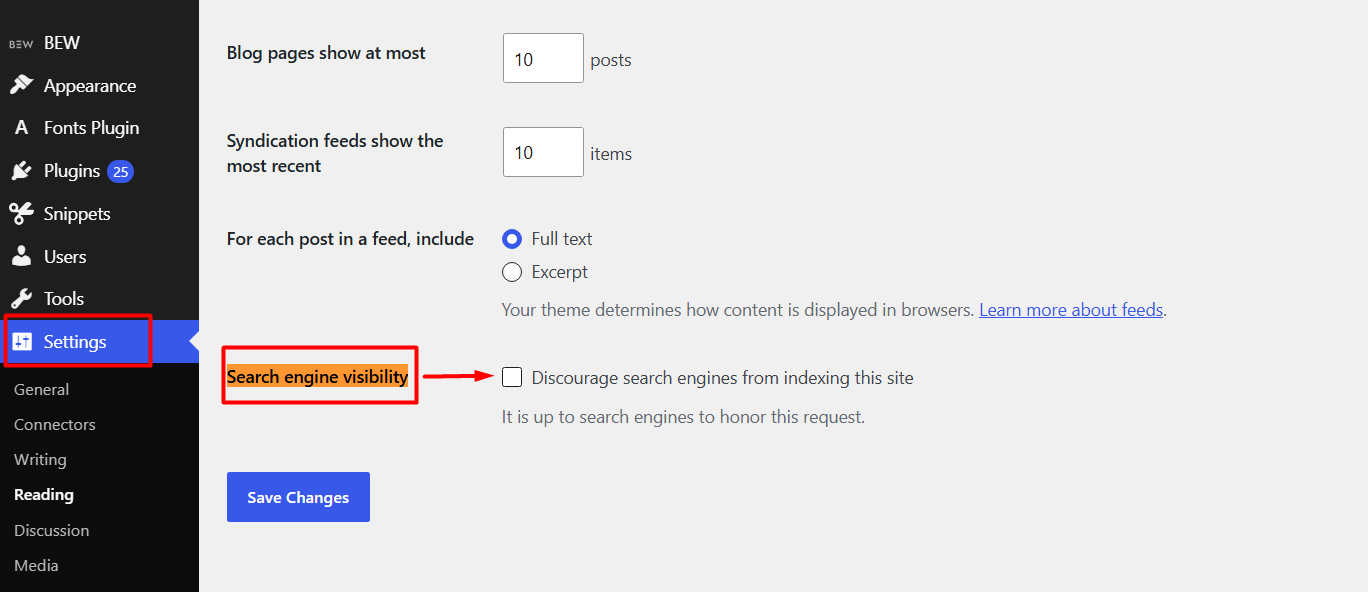
Go to Settings, then Reading.
Make sure “Discourage search engines from indexing this site” is unchecked.
Then check each page’s index setting in Yoast or Rank Math.
Why Is My Shopify Website Not Showing Up on Google?
A password page stops Google from entering your store.
Go to Online Store, then Preferences, and check password protection.
Keep your sitemap limited to the main product and collection URLs.

Why Is My Wix Website Not Showing on Google?
Every Wix page has its own SEO settings.
Make sure “Let search engines index this page” is switched on.
Also confirm the site is published and your premium domain is connected.
Why Is My Website Not Showing Up on Google on Squarespace?
Squarespace has a “Hide page from search results” option on each page.
A site-wide password or trial mode can also block indexing.
Check these two before anything else.
Why Is My GoDaddy Website Not Showing Up on Google?
First, confirm the site is published.
Then check that your domain points to the right site.
A GoDaddy domain can still point to an old hosting account or a parked page.
Why Is My Domain Not Showing Up on Google? DNS and Redirect Checks
If your site opens in a browser but never in Google, check the domain setup.
DNS and Redirect Checklist
- The www and non-www versions should redirect to one preferred version.
- The HTTP version should redirect to HTTPS.
- The A record should point to the correct server IP.
A wrong A record means Google may be seeing a different site.
A domain with a spam history may also take longer to appear.
SEO Audit and SEO Checker: When Tools Help
If the basics pass, run a full SEO audit.
A free SEO checker flags broken links, weak title tags, and poor internal linking.
Tools only show symptoms.
You still have to decide which issue matters first.
How to Make Your Website Show Up on Google First
Indexing only gets your pages into Google.
Ranking near the top needs three things.
- One clear search intent for every page.
- Internal links that support your best pages.
- Relevant backlinks from trusted websites.
Ranking improvements take time, and the timing varies.
Keep a simple log of every change and its date.
When rankings move, that log shows you why.
Stuck on Indexing? Let AlphaBL Fix It for You
Still asking why your website is not showing on Google? Finding the cause is one thing, and fixing it correctly is another. AlphaBL can review your indexing, crawling, and on-page issues and help you build a clear plan to get your pages found. If your business is in Lahore, take a look at our SEO Services Lahore page. If you are based in Sialkot, connect with our SEO expert in Sialkot. Visit AlphaBL today and take the first step towards being seen on Google.

Final Thoughts
Why is my website not showing on Google? In most cases, the answer sits in one small setting.
First, confirm whether your site is missing or simply ranking low.
Then check robots.txt, noindex, canonical tags, and DNS in that order.
Do not forget your platform’s own visibility setting.
Look at your Search Console data before you change anything on the site.
If you still cannot find the cause, a professional audit can help.
Frequently Asked Questions
How do I get my website visible on Google?
Verify your site in Search Console and submit your sitemap.
Then check robots.txt, noindex tags, and canonical tags.
Only after that should you focus on content and backlinks.
Why is my SEO not working?
SEO takes time to show results.
If you have waited and still see no progress, check your keyword choice and content quality.
Check these two before you pay for a technical audit.
How long does it take Google to index a new website?
It can take anywhere from a day or two to a few weeks.
After you submit a sitemap or an indexing request, wait at least a week before assuming there is a problem.
If the page is still missing after that, check it in the URL Inspection tool in Search Console.

Habib Ur Rehman is the Founder and CEO of Alpha BL, specializing in Digital Marketing and SEO.